Intakes
In DreamApply, intakes are used to define the admission timeline for specific academic terms. They include all stages of the application process such as:
- application submission,
- review,
- final decisions,
culminating in applicant enrollment. While academic terms indicate when students begin their studies, intakes capture all the steps that lead to that point.
Each intake targets a specific academic term and is linked to it. You can structure your admission workflow to include multiple intakes that target the same term. For example, you can have an Early intake, Primary intake and Late intake, all linked to the same term. Think of the term as a reservoir and each intake as a pipe that directs applicants toward it.
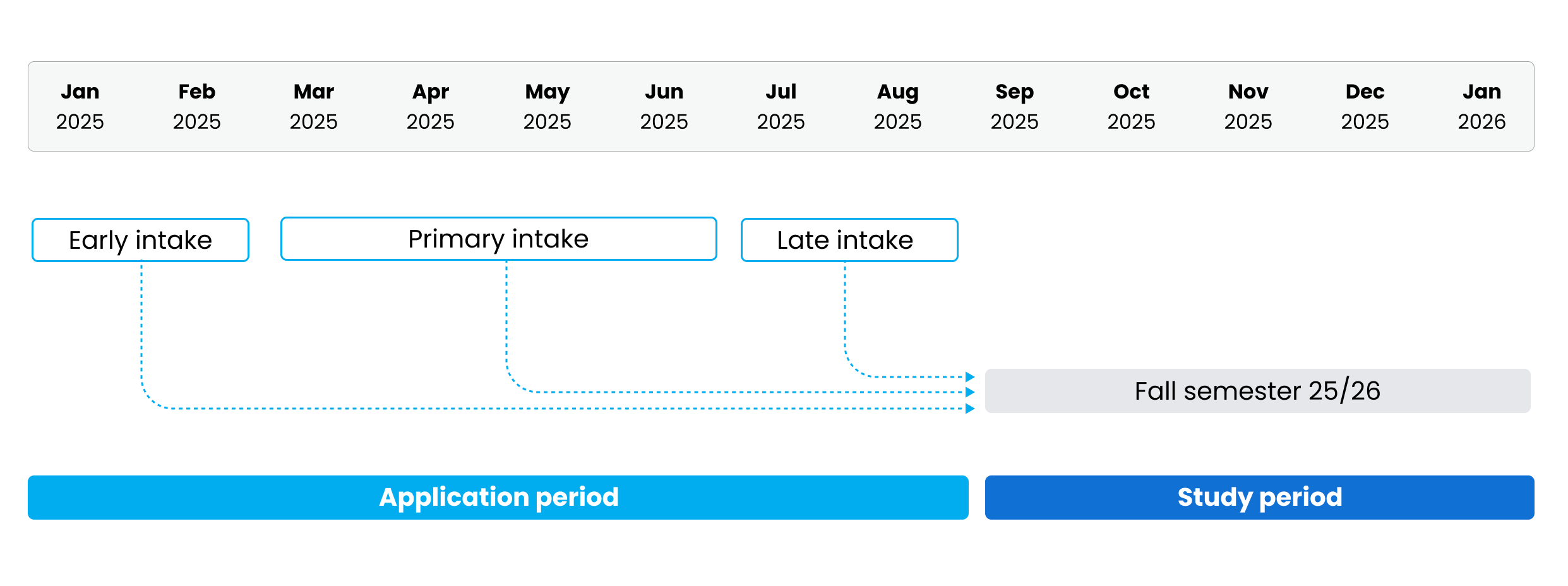
An intake begins when the application process opens, which is typically some time before the start of the term. DreamApply supports longer intakes when necessary. An intake may span several years — for example, you can configure an intake that starts in 2025 and concludes two years later.
Intakes are used internally by Administrators to manage the admission process. Applicants do not see intake details in the DreamApply portal — they only see the target academic terms.
Applicant categories and eligibility
Each intake represents a distinct admission period and can apply to specific applicant categories. For example, an institution can create separate intakes for international and domestic applicants, each with their own set of deadlines and requirements. This setup allows institutions to manage multiple admission paths in parallel and maintain a structured admission process.
Intake timing
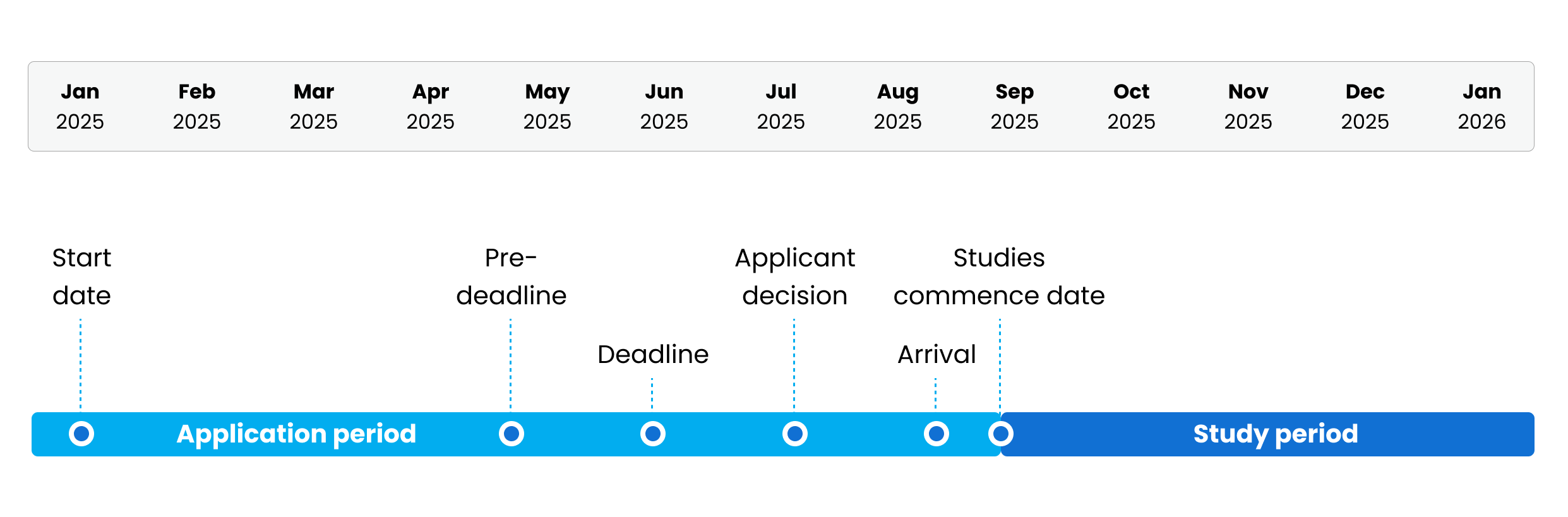
An intake includes a set of important dates that define the admission flow:
Start date: The date when the application process opens and the Apply now! button becomes active. Institutions can control the button visibility and state, making it inactive or hidden depending on their admission flow, number of intakes and their timings.
Pre-deadline: An optional date used to encourage early applicants. Institutions can choose to display the pre-deadline or show both the pre-deadline and final application deadline next to the Apply now! button.
Deadline: The last date when applicants can submit their applications for the intake.
Applicant decision: The date by which applicants must respond to any offers they receive. This setting allows institutions to set a default offer decision date. When an offer is sent, DreamApply automatically populates the Applicant decision field with this date from the intake settings. Administrators can override this date with a custom one for individual offers.
Arrival date: The date when applicants are expected to start arriving on campus. The arrival date is mainly for informational purposes and can be used in content markers and data exports.
Studies commence date: The actual start date of studies. While it usually coincides with the start date of the term, DreamApply does not require an exact match. Institutions can choose to display this date next to the Apply now! button or keep it hidden.
The studies commence date is mainly for informational purposes and can be used in content markers and data exports. After the study commence date has passed, the following limitations apply:
- The Apply now! button is automatically disabled for intakes with flexible deadlines.
- Programmes that are linked only to an intake whose study commence date has passed (and not to any future intakes) are no longer displayed in the catalog and are not available in search results. However, they remain accessible by direct link.
All intake dates must follow chronological order. To prevent any configuration issues, DreamApply automatically verifies the date sequence when an intake is saved.
Intake deadlines
DreamApply allows institutions to set up deadlines for intakes at multiple levels to reflect the admission rules for different territories. These rules are applied based on the citizenship applicants select during their application.
DreamApply offers two types of deadlines:
- Date: Applicants from a specific territory can apply until a set date.
- Do not allow to apply: Applicants from a specific territory cannot apply at all. The Apply now! button becomes disabled and the portal informs that this intake is not applicable for applicants from this territory.
To determine which deadline applies, DreamApply uses a hierarchical approach. It starts from the most specific level and moves up to more general levels, for example: country → region → subregion or part of the world → continent → global (World).
If no deadline is set at a specific level, DreamApply checks the next applicable parent level. In cases where multiple valid deadlines exist at the same level (for example, if an applicant belongs to two overlapping regions), the system applies the most favorable (latest) deadline.
For example, an applicant has set their citizenship to Estonia. DreamApply will enforce deadlines in the following way:
- If no country-specific deadline is set, but Northern Europe has a deadline of June 10 and the European Union has a deadline of June 15, the applicant can apply until June 15.
- If no country-specific deadline is set, but Northern Europe has a deadline of June 15 and applicants from the European Union are not allowed to apply, the applicant can apply until June 15.
Deadline policies
For each intake deadline, institutions can set up a deadline policy to define how strictly this deadline is applied.
DreamApply offers the following policies:
Flexible: Deadlines are visible but not enforced. Applicants can see deadlines next to the Apply now! button, but they are still allowed to apply until the studies commence date. This option is useful when institutions want to keep the admission process open for late applicants.
Rolling: Deadlines are not displayed to applicants at all, the study commence date is displayed for informational purposes only. Applicants can apply after the intake start date without deadlines. This option is useful for open and ongoing admissions where institutions review applications as they come in.
Strict: DreamApply enforces deadlines and ensures applicants comply with them. This mode is restrictive and is useful for programmes with high demand or limited seats.
The Strict policy has two enforcement modes:
- Enforce when adding priorities: The Apply now! button becomes inactive after the deadline. Applicants who clicked the button before the deadline can continue completing and submitting their applications.
- Enforce on first submission: The Apply now! button becomes inactive after the deadline. Applicants must complete and submit their applications before the deadline.
To prevent applicants from re-opening and editing their applications after the deadline, DreamApply offers the Also block reopens and re-submissions option. If this option is enabled, submitted applications become read-only for applicants after the deadline. Only Administrators can re-open and modify them as needed.