DreamApply basics
DreamApply is an admission system designed to manage all aspects of student enrollment. It provides a centralized solution to handle each stage of the admission process, from application submission to student onboarding.
DreamApply does not replicate traditional institution processes and paperwork. Instead, it lets institutions set up a custom digital workflow that aligns with their admission policies and operational requirements. With DreamApply, institutions can streamline and automate important parts of the process, including:
- Application submission and validation
- Document verification
- Application assignment
- Decision-making and notifications
DreamApply’s admission workflows are designed for long-term use. Once implemented, they can be consistently applied each year with minimal adjustments needed to reflect updates in the admission criteria, policies or guidelines.
Solution architecture
DreamApply operates as a Software-as-a-Server (SaaS). It is a cloud-based solution accessible over the internet through a web browser on both desktop and mobile devices.
DreamApply is fully managed in the cloud, so institutions do not need to build and maintain their own infrastructure. The solution can automatically scale to handle a growing number of users and ensure reliable performance. DreamApply keeps its system operating 24/7 to let applicants submit their applications anytime, from any part of the world.
To provide the cloud infrastructure and support core operations in the admission process, DreamApply leverages several trusted third-party services. These include cloud hosting providers, email services, data protection, logging tools and others.
DreamApply complies with international standards for physical and digital security. Its servers are hosted in secure data centers, and the company uses industry-standard encryption protocols to encrypt sensitive application and customer data both in transit and when stored in the cloud.
Instances
Each organization in the DreamApply cloud is assigned its own isolated instance. The instance comprises all services, resources, data and configurations specific for a particular organization. DreamApply instances are fully segregated from one another so that cloud tenants are unable to cross-access sensitive information.
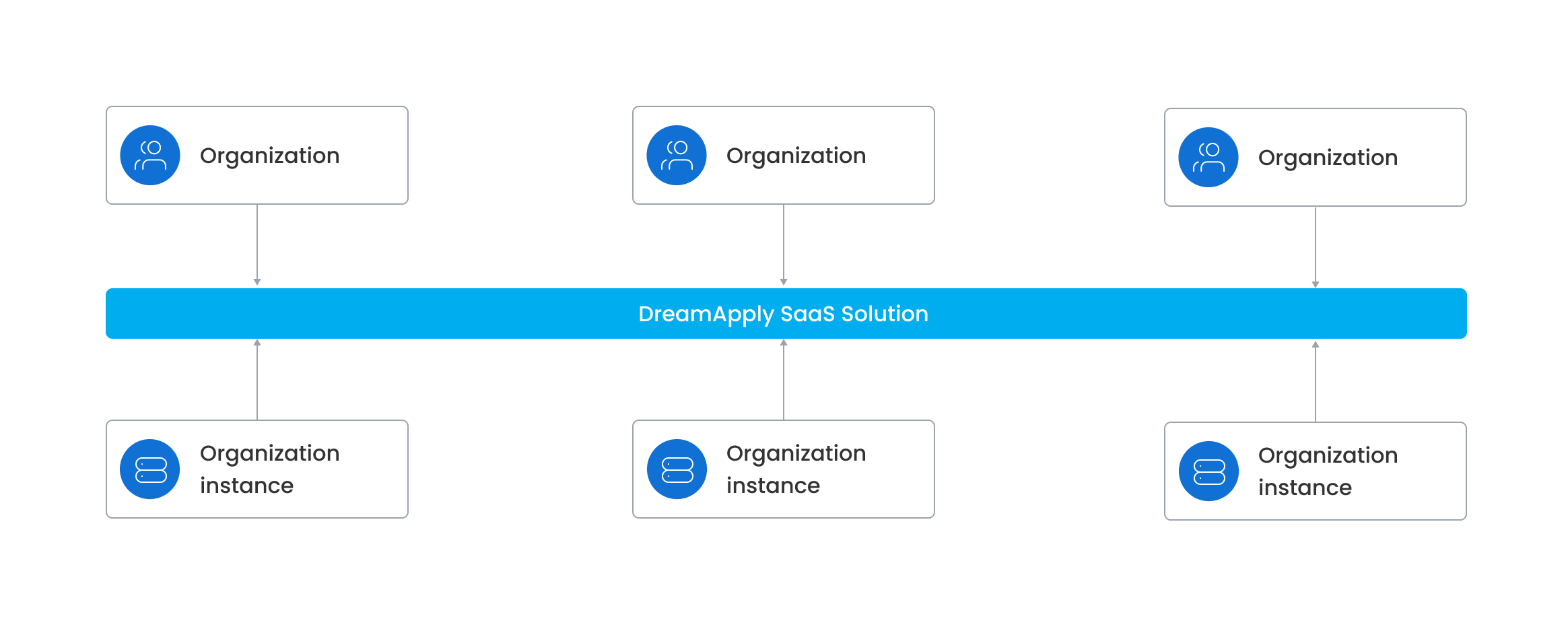
To get a DreamApply instance for their organization, institutions need to contact the DreamApply team. The DreamApply team provisions a new instance, enables all required modules and functionalities required for the admission process and creates one or more Administrator accounts with high-level privileges. Every instance comes pre-loaded with sample data to simplify configuration and help institutions get started quickly.
Once the instance is provisioned, the institution gains access to the DreamApply portal, a central hub for managing the admission process. The portal provides role-based access for different user groups, including admission team members, applicants, advisors and website visitors. DreamApply implements strict access control mechanisms to protect sensitive data and guarantee that only authorized personnel can view, modify or process application-related information.
Compliance and audit
DreamApply is committed to maintain high compliance and security standards. The solution is ISO 27001 certified and complies with international data protection regulations, including General Data Protection Regulations (GDPR). DreamApply conducts regular security audits and vulnerability assessments to identify and address potential security risks.
DreamApply resources
During the admission process, DreamApply creates and manages multiple resources that establish an efficient data flow. To navigate the DreamApply system, it is essential to understand these resources, their functions and how they interact.
Institutions, departments and programmes
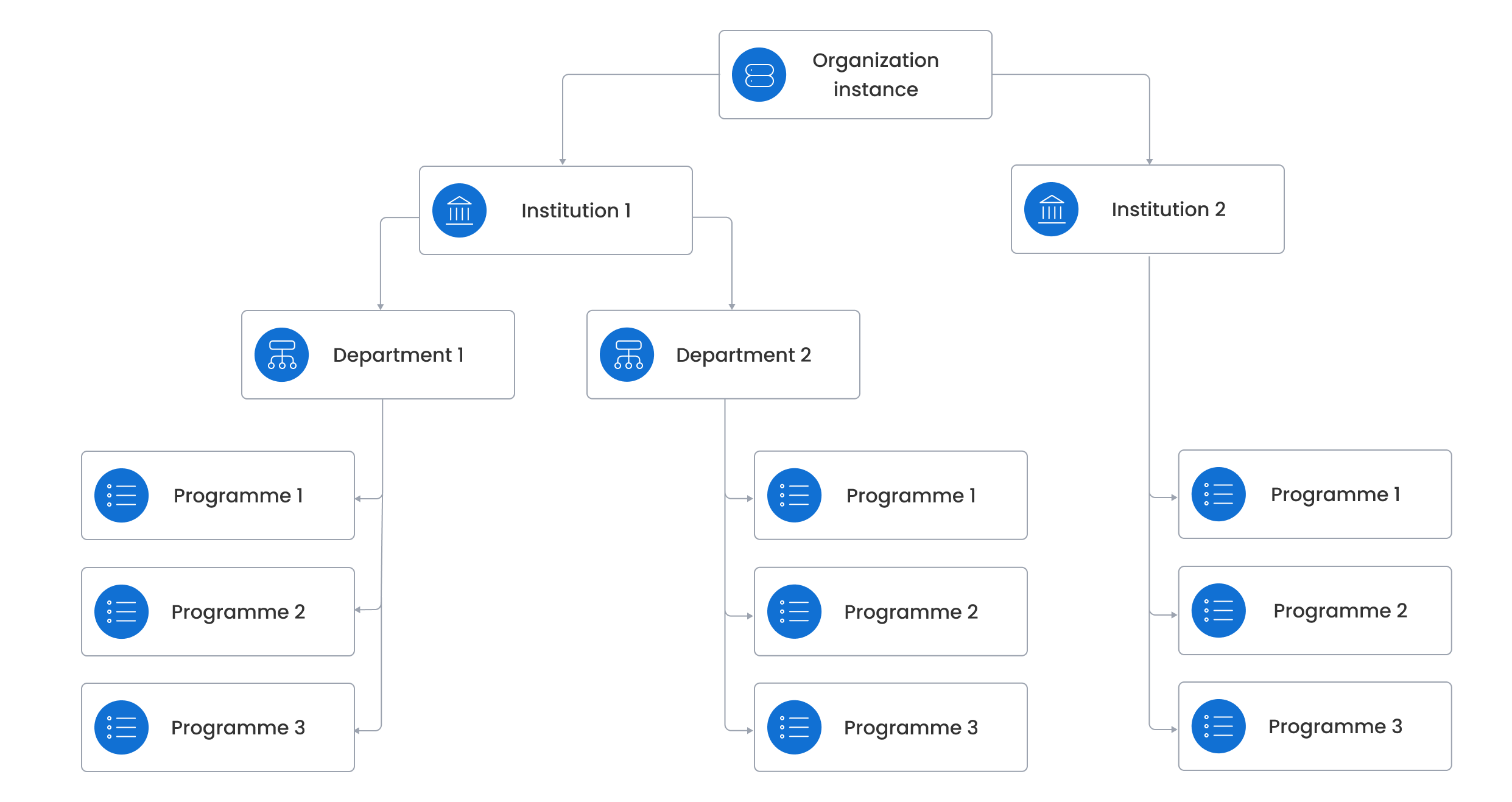
After its instance is deployed, the first step is to configure settings for the institution to reflect the structure and data of a real-world organization. DreamApply supports both single-institution setups for organizations operating as single entities and multi-institution setups for federated organizations with multiple branches.
If the institution is organized into departments, faculties or campuses, DreamApply allows you to structure it accordingly using these organizational units.
In DreamApply, every institution has its own programme catalog. A programme represents a specific course of study offered by an institution. Each programme always belongs to an institution and can be additionally linked to a department.
Applications and applicants
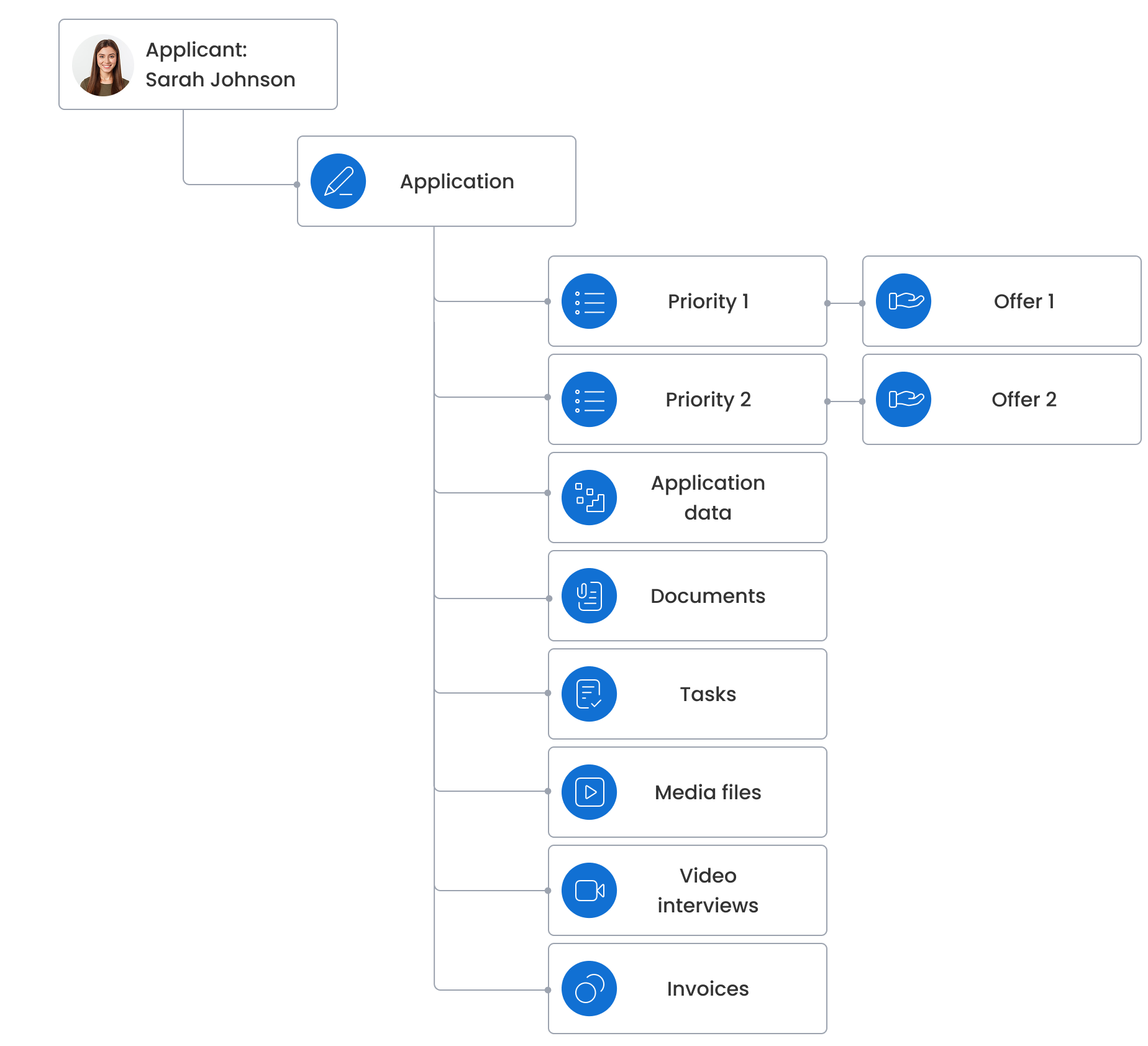
An application is a key entity in DreamApply. It functions as a container that holds and connects various sub-resources throughout the admission process, including:
- Application data
- Priorities
- Offers
- Documents
- Tasks
- References
- Media files
- Video interviews
- Invoices
Each application is owned by an applicant who submits and manages it. In DreamApply, an applicant can be a natural person applying for themselves or a delegate applying on behalf of someone else, for example, a legal entity or a child.
Priorities and offers
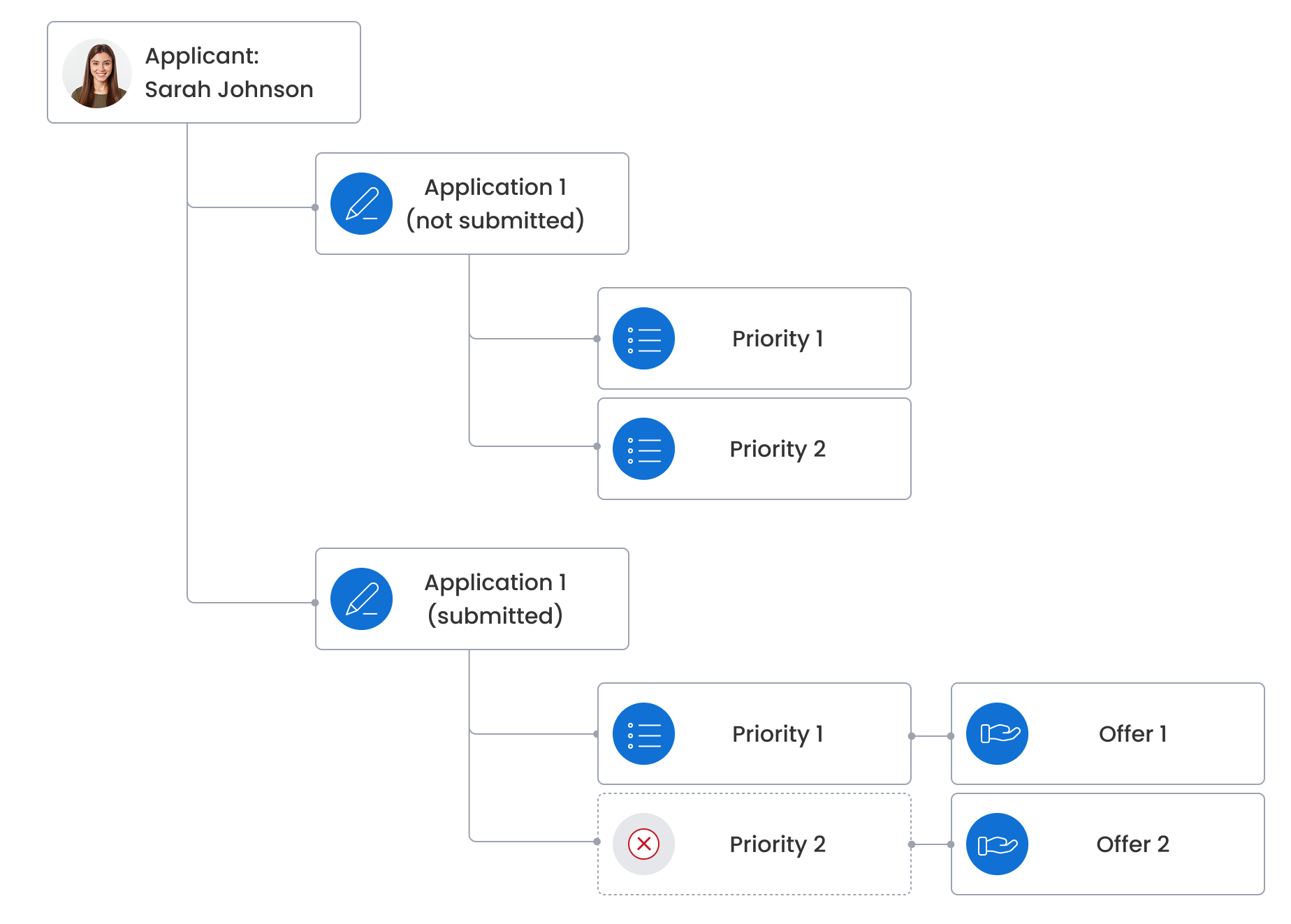
During the admission process, an applicant can apply for one or more programmes. In DreamApply, a single application can include multiple programmes, or the system can create a separate application for each added programme. This behavior depends on how the institution sets up application grouping.
When a programme is placed on an application, it becomes a priority. The priority determines the sequence in which DreamApply evaluates and processes the applicant’s choice.
After the application is submitted, DreamApply creates an offer for each priority and links it to that priority. Initially, each offer is assigned the Unreplied type. Even if a priority is later removed from the application, the offer associated with it remains linked to the application.
Interviews and tasks
As part of the evaluation process, applicants may be invited to complete a video interview. In DreamApply, interviews are linked directly to applications.
Applicants may also be assigned tasks such as submitting additional documents or a portfolio. Tasks are also linked to applications. The institution may assign tasks without deadlines or require an applicant to complete tasks within the given timeframe.
Invoices
Applicants may receive invoices for various charges, including:
- Application fees
- Tuition fees
- Other administrative costs
In DreamApply, invoices are typically linked to applications. For legacy reasons, they may also be linked to applicants.
Scoresheets and scores
To record and manage applicant evaluations, institutions can use scoresheets in DreamApply. A scoresheet collects scores from different sources, including applicants themselves, Administrators and external evaluators.
To systematically assess submitted applications, the admission team adds them to scoresheets. When an application is added to a scoresheet, DreamApply links the two and creates a score entry. A score is essentially a row on a scoresheet that can hold the following data:
- Numeric points assigned to the applicant
- Notes from evaluators
- Metadata such as the date when the score was recorded