How data transfer works
To integrate DreamApply with ESSE3, an institution must collaborate with DreamApply and Cineca.
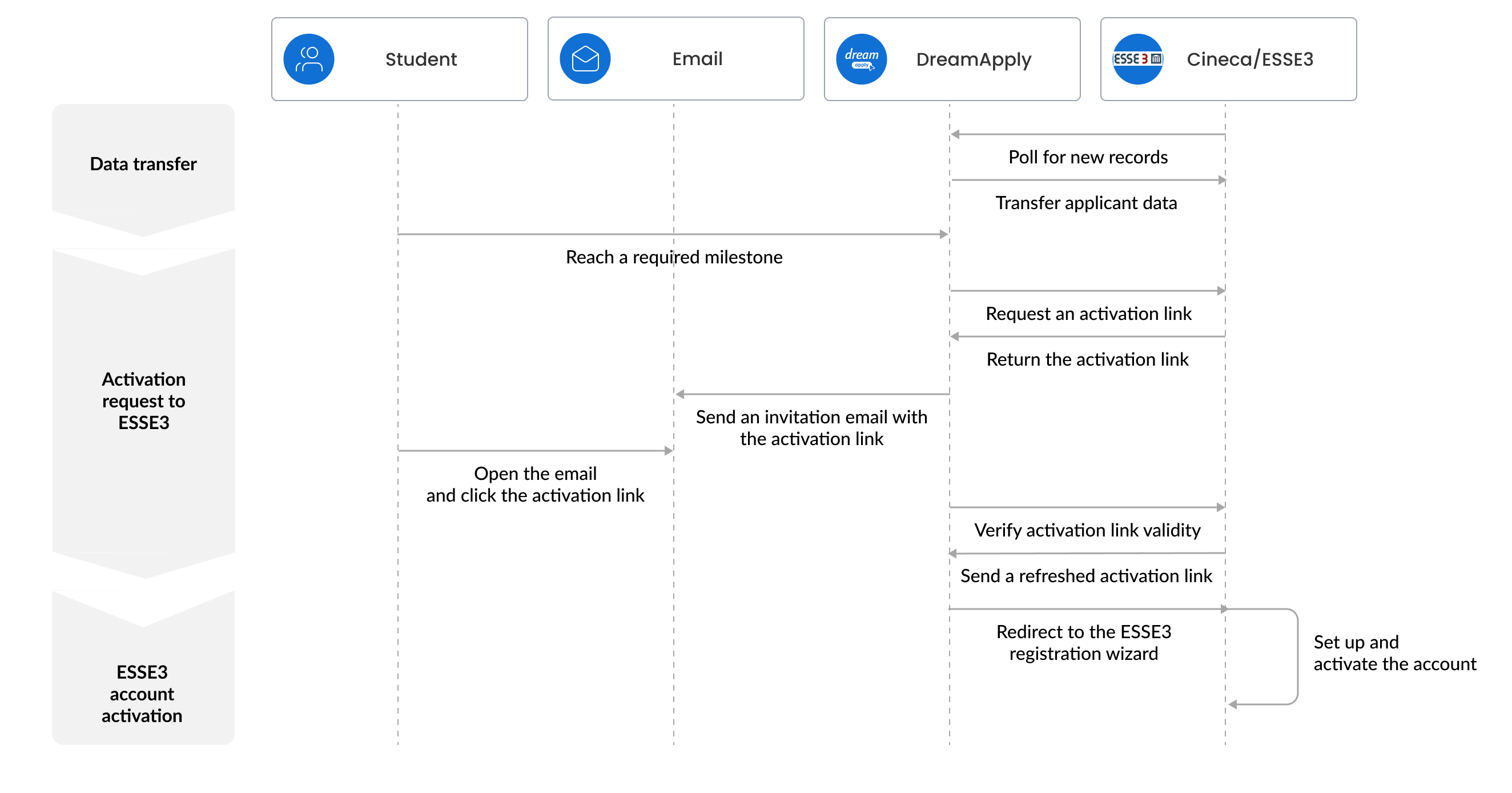
Data transfer between DreamApply and ESSE3 is an ongoing process that includes the following stages:
Data transfer: ESSE3 periodically polls DreamApply to fetch a list of new applications in the DreamApply portal. For each new application, ESSE3 fetches essential information, including applicant personal details, uploaded documents, applied programmes and the application ID. The retrieved data is stored in the ESSE3 platform.
Activation request to ESSE3: When applications reach a specific milestone in the application process, DreamApply sends a request to ESSE3 to activate applicant accounts. DreamApply allows sending requests automatically or manually.
At this stage, the parties perform following tasks:
- DreamApply sends a request to get an activation link from ESSE3, providing the necessary application ID.
- ESSE3 returns the activation link to DreamApply.
- DreamApply sends an invitation email with the activation link to applicants to let them register in ESSE3.
- When applicants click the activation link, DreamApply refreshes the activation link and redirects applicants to the ESSE3 registration wizard.
If ESSE3 has not retrieved application data by this moment, DreamApply will fail to send the activation link (step “c”). In this case, DreamApply will retry the request every 2 hours for 30 days.To monitor the status of activation requests, DreamApply offers the ESSE3 report.
ESSE3 account activation: The applicant follows the registration wizard. While some information in the registration wizard is pre-filled with data fetched from DreamApply, applicants may need to provide remaining details manually. In some cases, Cineca and ESSE3 automatically generate data and populate the necessary fields (for example, an Italian fiscal code).
ESSE3 then employs its identity system to generate credentials for applicants and activate their accounts in ESSE3.