Integrate with Flywire
Roles
These roles reflect the default DreamApply setup.
You can define custom roles based on your
institution's needs. Learn more →:
You can define custom roles based on your
institution's needs. Learn more →
Flywire is a global international platform that allows institutions to securely collect and process payments.
To enable payments using Flywire, perform the following tasks:
Before you begin
To integrate with DreamApply, your account must have the Superuser role or the accounting-gateways permission.
Obtain the Flywire API credentials
To start using Flywire with DreamApply, you need to obtain the following Flywire API credentials:
- Payment destination
- Shared secret
API credentials are provided by Flywire as part of the onboarding process. To obtain them, contact the Flywire team to start the registration process and set up an account.
Ensure the credentials you receive are for the production (live) environment. Sandbox (test) credentials cannot be used for live payment transactions in DreamApply.
Configure the Flywire gateway
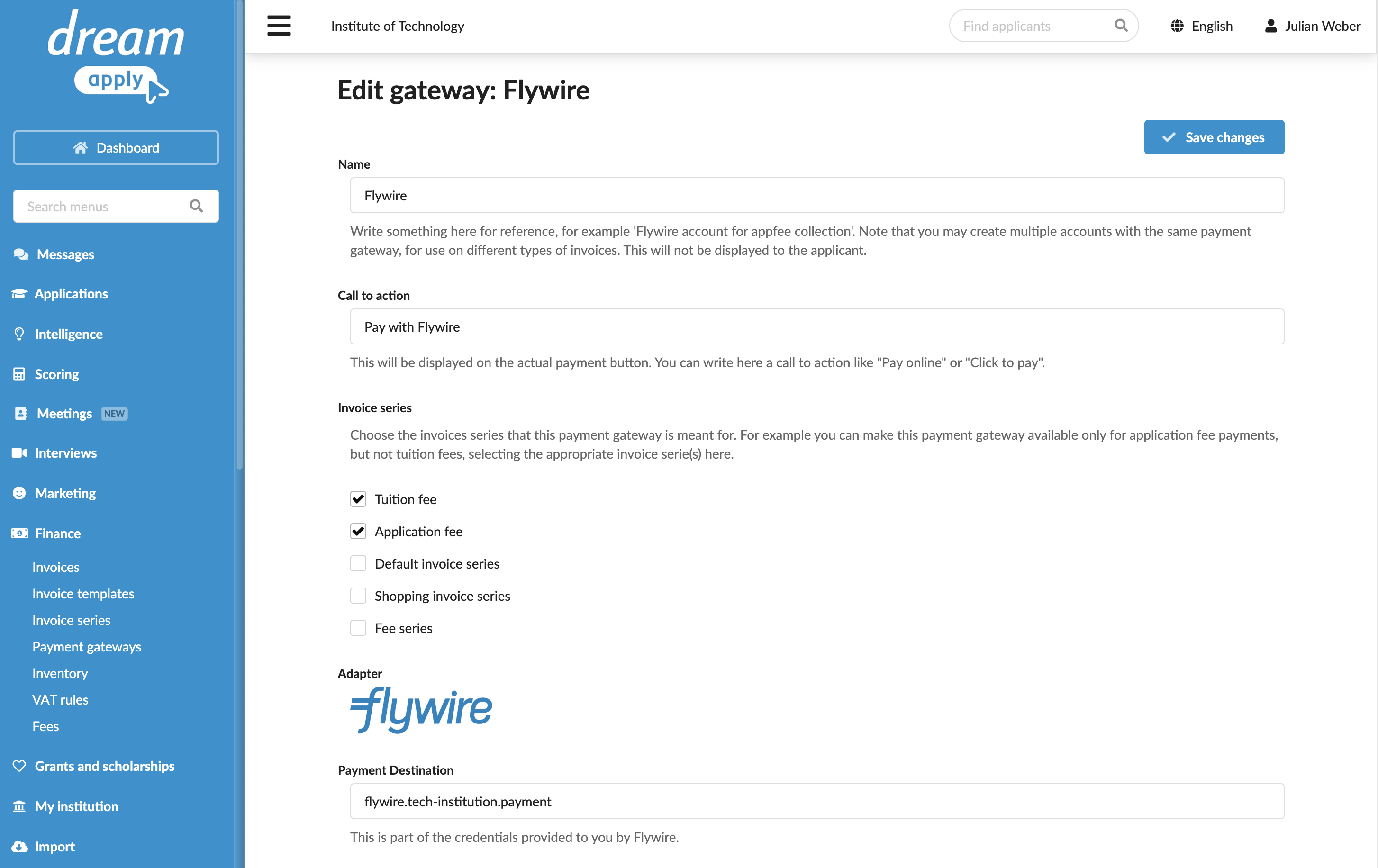
To configure a Flywire payment gateway in DreamApply:
In the main menu, under Finance, select Payment gateways.
In the gateway list, select Flywire.
Specify the gateway settings:
In the Name field, specify the gateway name. This name will be used for internal reference only and will not be displayed to applicants.
In the Call to action field, specify the text to display on the payment button on financial documents, for example, Pay with Flywire.
In the Invoice series section, select check boxes next to the invoice series that must be processed through the Flywire gateway. If a specific series is not selected, DreamApply will not display the payment button on documents that use this series.
You can link the same invoice series to several payment gateways to allow applicants to choose their preferred payment option.
Specify the API credentials obtained from Flywire.
In the Currency field, specify the currency set for your Flywire account.
At the top of the form, click Save changes.
Redirect applicants to DreamApply
In some cases, the Flywire integration may redirect applicants to the Flywire external landing page to complete payments. If this happens, all payment details and confirmation are handled entirely on the Flywire side and are not synchronized with DreamApply. As a result, DreamApply will not be able to display real-time statuses of collected payments.
To establish a correct data flow, we strongly recommend that you contact the Flywire team to ensure applicants are redirected to: https://your-institution-name.dreamapply.com/invoices.
Payment processing
Flywire follows an asynchronous payment processing model. When an applicant initiates a payment, the confirmation is not sent immediately. Flywire may take several minutes or even days to finalize the transaction. DreamApply continues checking for the payment status and updates the invoice status as soon as it receives a confirmation from Flywire.