Entry point basics
Entry points are special URLs generated by DreamApply. Institutions can place these URLs in their marketing materials to track which campaigns bring users to the DreamApply portal.
When a user clicks such a URL, DreamApply captures the tracking data and then immediately redirects them to their intended webpage or content. Depending on how the entry point is configured, the destination can be:
- Page in the DreamApply portal
- External URL
All tracking statistics on entry points is collected in DreamApply. With it, institutions can monitor campaign effectiveness and understand how users arrive at DreamApply.
Types of entry points
You can create multiple entry points for different campaigns, social media channels and advertising platforms. DreamApply supports the following entry points:
- Landing pages: An entry point URL that captures the tracking data when clicked and then redirects users to their final destination.
- Tracking templates: A URL structure used with Google Ads that allows the marketing team to understand how users interact with these ads.
- Referrer domain tracking: A method to log the domains from which users arrive at DreamApply and understand which websites send users.
A single entry point can combine multiple tracking methods. For example, you can set up an entry point to collect information about Google Ads behavior and referrer domains. Alternatively, you can set up separate entry points for each campaign material or platform for more granular control and analysis.
How entry points work
Think of the entry point as a doorway with a built-in counter. Users do not linger at the entry itself; instead, they step through it and are immediately sent to their final destination.
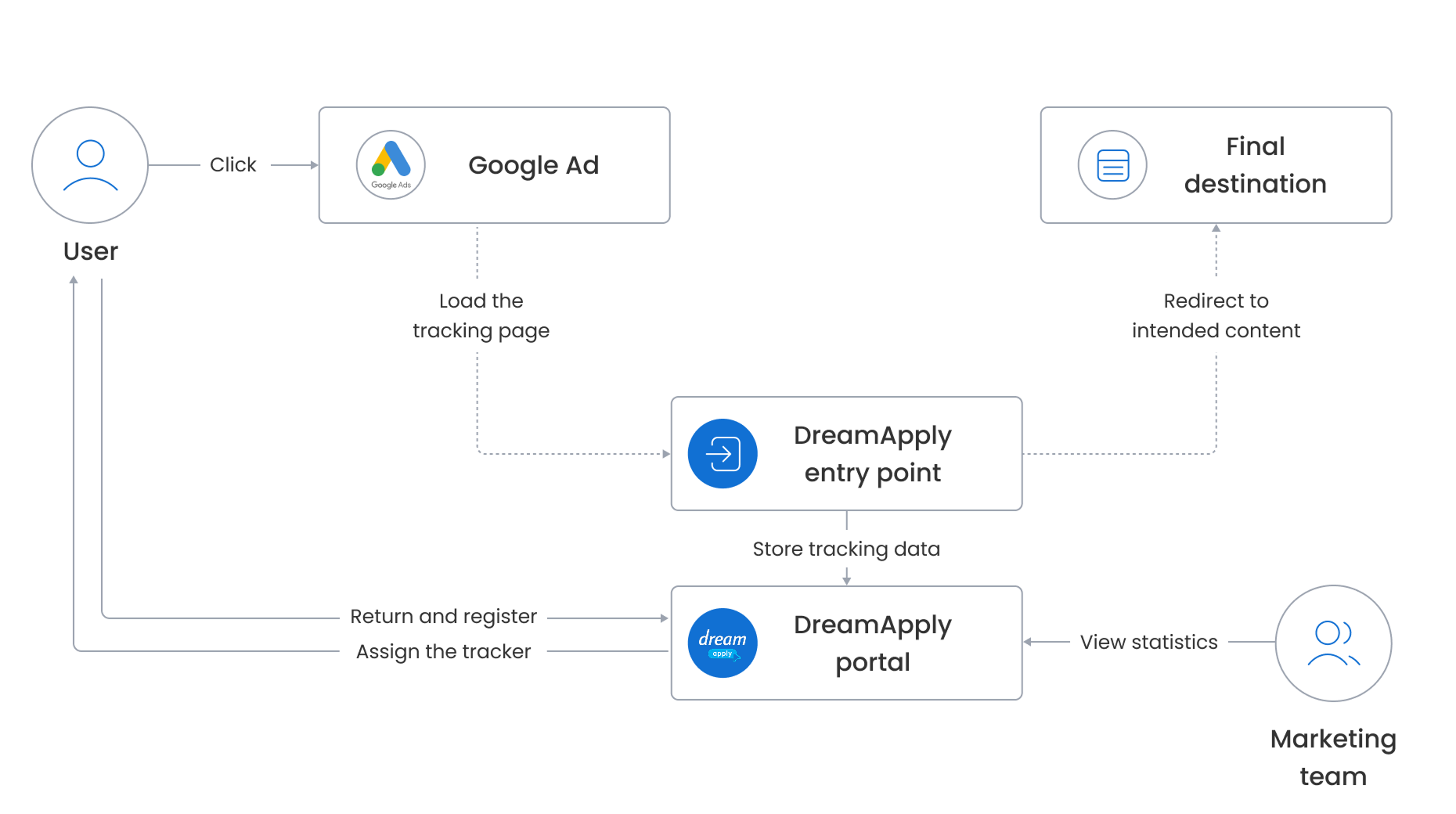
Behind the scenes, DreamApply tracks clicks on entry point URLs in the following way:
A user clicks an entry point URL placed in campaign materials.
DreamApply loads a minimal tracking page available by the entry point URL, records the user click and stores the entry point ID to later link it with a lead. At this point, DreamApply also captures other tracking information:
- Referral and campaign data
- User-related details, such as platform, browser and country
The user is automatically redirected to their final destination, for example, a programme description page, campaign page or an external website. This happens instantly, without any noticeable delays.
If the user returns and registers in DreamApply, the system retrieves the stored entry point ID and assigns the associated tracker to the lead.
The captured clicks, referral and campaign data are displayed in the DreamApply tracking statistics. This allows the marketing team to analyze which campaigns are generating clicks, return visits and registrations.
Tracker assignment
The main purpose of entry points is to identify how users arrive at DreamApply and assign a specific tracker to them. This helps institutions trace the source of visits and connect these visits with registered users, applicants and even enrolled students.
DreamApply can assign trackers to users in two ways:
- Registered users: If a user is already registered and logged in to DreamApply, DreamApply immediately assigns the tracker associated with the entry point to that user.
- Guest users (not logged in): If a user is not logged in, DreamApply temporarily stores the tracking data on the server or client side. If that user later returns and registers, DreamApply assigns the associated tracker to them.
Tracking data storing
DreamApply offers two mechanisms for storing the tracking data:
Session-based (server-side): DreamApply stores the tracking data in the session data on the server and keeps it while the user session is active (the browser window is open). If the user registers during the same session, DreamApply assigns the tracker to the user. If the user closes the browser window, the session data is discarded. In this case, DreamApply only increments the entry point counter and uses the captured referral and campaign data for reporting.
Cookie-based (client-side): If a user agrees to cookies, DreamApply stores the tracking data in cookies within their browser. This allows the system to assign the tracker even if the user closes the browser window and returns later.
DreamApply always stores tracking data on the server side. Cookies are only used if a user grants explicit consent. For details, see Cookie consent.
Entry point counting
In its simplest form, when a user clicks an entry point URL, DreamApply records the visit and increases the counter by one.
DreamApply counts unique entry point traversals within a single browser session. If a user visits the same entry point multiple times within the same session, the visit is counted only once. If they start a new session — close and re-open their browser window or access the entry point URL from a different device — the visit is counted again.
Cookie consent
DreamApply supports several consent modes to handle cookies:
- Implied consent: DreamApply assumes that a user grants consent when they set their citizenship. In this mode, all cookies are allowed and the tracking data can be stored in cookies within their browser.
- Polite bar and Assertive dialog: A user sees a consent window that allows them to choose which types of cookies to accept. If the user does not explicitly grant consent, tracking data will not be stored in cookies.
DreamApply waits for the user’s consent before storing any data in cookies. Until consent is granted, DreamApply temporarily stores the tracking data in the session data on the server.
- If the user grants consent, DreamApply replicates this data to cookies for future use. If the user returns and registers, DreamApply assigns the tracker to the user. After that, the session data and cookies are cleared.
- If the user does not grant consent, the session data is discarded as soon as the session ends.
Cookies set by DreamApply are marked with the HttpOnly flag for additional protection. This ensures that they are not accessible to client-side scripts or third-party applications.
Anti-bot
To improve accuracy, DreamApply excludes known automated traffic such as bots, web crawlers and similar tools from tracking statistics. However, some edge cases may still result in false positives or uncounted sessions. For example, if a user accesses the system through a VPN solution running in the cloud, clicks on entry point URLs may not be captured.