Catalog setup basics
The programme catalog in DreamApply helps institutions organize and manage their academic offerings in a structured way.
Programme catalog structure
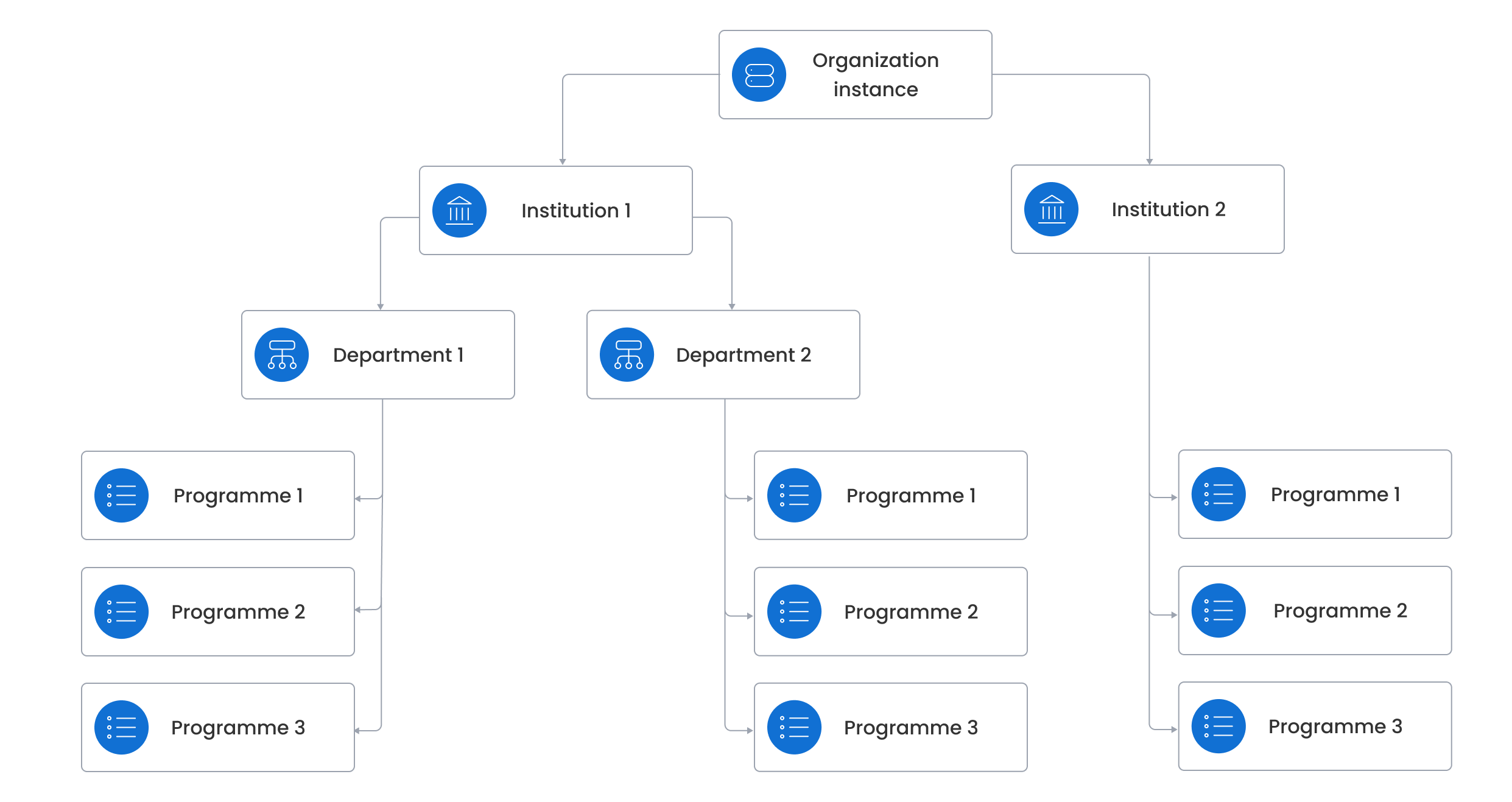
DreamApply allows institutions to organize programmes in various ways to support different academic structures. Programmes can be:
- Grouped by department: Programmes can belong to different academic departments within an institution.
- Linked to an institution: Programmes can be directly linked to an institution.
In addition to structuring by institution and department, programmes are always linked to specific intakes, which defines when they are open for admission.
Programme statuses
A programme has a status that controls how it appears to applicants and Administrators. Programme statuses help institutions manage programme visibility and their lifecycle.
DreamApply offers the following programme statuses:
- Draft: The programme is in progress and is not visible to applicants.
- Online: The programme is active and visible to applicants. Applicants can search the programme in the catalog. This status can be used for programmes open to general admission.
- Private: The programme is active but is not listed in the catalog. Applicants can only access it through a direct link. This status is useful for internal offerings and special admission paths.
- Standby: The programme is temporarily hidden and unavailable to applicants.
- Archived: The programme is inactive but kept for historical records.
- Closed: The programme is no longer accepting applications.
Appforms and programme-specific settings
Each programme in the catalog is linked to an appform that applicants use to apply. This appform is displayed to applicants when they add a programme to their application.
In addition to main appforms, institutions can define programme-specific settings to collect extra information for a particular programme. When these settings are configured, DreamApply automatically adds the programme-specific sections and fields to the appform.
If an applicant applies for several programmes, DreamApply automatically merges all appform sections into one unified appform and removes any duplicates to avoid redundant data entry.
Programme fees
Programmes can have one or more fees linked to them such as:
- Programme fee
- Examination fee
- Registration fee
By setting up programme fees, institutions can define a full set of charges associated with a programme.
Programme tasks
Institutions may require applicants to complete activities critical for a successful application. To achieve this, institutions can set up tasks and link them to specific programmes.
Programme scoring
For each programme, institutions can define specific evaluation criteria to determine applicant eligibility. They can collect scores for each applicant using scoresheets and calculate a final score based on a custom formula. DreamApply then uses these final scores to automatically generate a ranking list and identify top candidates.
Programme quotas
To limit the number of offers made to applicants for a specific programme, institutions can use offer quotas. Offer quotas help control how many offers are sent out during the admission process.
Recommended setup approach
We recommend programme cloning as a primary method of catalog setup. This approach streamlines catalog creation and ensures consistency across programmes.
To set up the catalog:
- Start with a set of base programmes: Create a few generic templates for your typical programme types.
- Clone and customize: Duplicate a base programme and adjust programme-specific fields such as title, department, appforms, fees and intakes.
Institutions with existing programme catalogs in external sources can choose to import their catalogs in DreamApply. Please note that direct import is not available through the DreamApply portal. To initiate the catalog import, please contact the DreamApply team.