Tables
To create tables, separate each table cell with the pipe symbol |.
| Cell text | Cell text | Cell text |
| Cell text | Cell text | Cell text |<table>
<tbody>
<tr>
<td>Cell text</td>
<td>Cell text</td>
<td>Cell text</td>
</tr>
<tr>
<td>Cell text</td>
<td>Cell text</td>
<td>Cell text</td>
</tr>
</tbody>
</table>
Table caption
To add a table caption (the <caption> tag), start a line with |=. followed by the caption text. Place the caption immediately above the first row of the table or the table head.
|=. Table Caption
| Cell text | Cell text | Cell text |
| Cell text | Cell text | Cell text |<table>
<caption>Table Caption</caption>
<tbody>
<tr>
<td>Cell text</td>
<td>Cell text</td>
<td>Cell text</td>
</tr>
<tr>
<td>Cell text</td>
<td>Cell text</td>
<td>Cell text</td>
</tr>
</tbody>
</table>
Table head
To add a table head (the <thead> tag), place |^. on a line before the header row and |-. on a line after it.
To define column headings, start each header cell with |_..
|^.
|_. Column Header |_. Column Header |_. Column Header |
|-.
| Cell text | Cell text | Cell text |
| Cell text | Cell text | Cell text |<table>
<thead>
<tr>
<th>Column Header</th>
<th>Column Header</th>
<th>Column Header</th>
</tr>
</thead>
<tbody>
<tr>
<td>Cell text</td>
<td>Cell text</td>
<td>Cell text</td>
</tr>
<tr>
<td>Cell text</td>
<td>Cell text</td>
<td>Cell text</td>
</tr>
</tbody>
</table>
Table footer
To add a table footer (the <tfoot> tag), place |~. on a line before the footer row and |-. on a line after it.
|~.
| Table Footer |
|-.
| Cell text | Cell text | Cell text |
| Cell text | Cell text | Cell text |<table>
<tfoot>
<tr>
<td>Table Footer</td>
</tr>
</tfoot>
<tbody>
<tr>
<td>Cell text</td>
<td>Cell text</td>
<td>Cell text</td>
</tr>
<tr>
<td>Cell text</td>
<td>Cell text</td>
<td>Cell text</td>
</tr>
</tbody>
</table>
Text alignment
You can use modifiers to align content both in table heads and table cells.
Table head
To align content in the table head horizontally, start each cell with:
|_<.to left-align text|_>.to right-align text|_=.to center text
|^.
|_<. Column Header |_<. Column Header |_<. Column Header |
|-.
| Lorem ipsum dolor sit amet, consectetur adipiscing elit | Lorem ipsum dolor sit amet, consectetur adipiscing elit | Lorem ipsum dolor sit amet, consectetur adipiscing elit |
| Lorem ipsum dolor sit amet, consectetur adipiscing elit | Lorem ipsum dolor sit amet, consectetur adipiscing elit | Lorem ipsum dolor sit amet, consectetur adipiscing elit |<table>
<thead>
<tr>
<th style="text-align:left;">Column Header </th>
<th style="text-align:left;">Column Header </th>
<th style="text-align:left;">Column Header </th>
</tr>
</thead>
<tbody>
<tr>
<td> Lorem ipsum dolor sit amet, consectetur adipiscing elit </td>
<td> Lorem ipsum dolor sit amet, consectetur adipiscing elit </td>
<td> Lorem ipsum dolor sit amet, consectetur adipiscing elit </td>
</tr>
<tr>
<td> Lorem ipsum dolor sit amet, consectetur adipiscing elit </td>
<td> Lorem ipsum dolor sit amet, consectetur adipiscing elit </td>
<td> Lorem ipsum dolor sit amet, consectetur adipiscing elit </td>
</tr>
</tbody>
</table>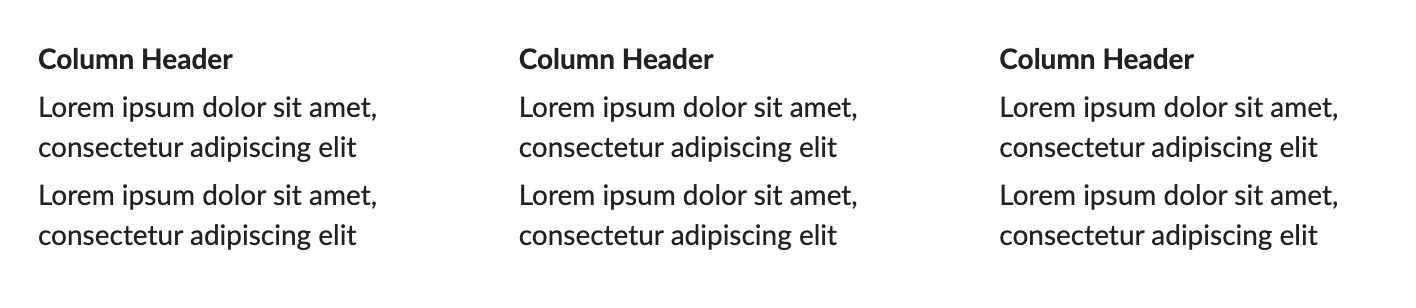
Table cells
To align cell content vertically, start each cell with:
|^.to align content to the top|-.to align content to the middle|~.to align content to the bottom
To align cell content horizontally, start each cell with:
|=.to center text|>.to right-align text- No modifier aligns text left
|^.
|_. Column Header |_.  Column Header |_. Column Header |_. Column Header |
|-.
| Lorem ipsum dolor sit amet, consectetur adipiscing elit, sed do eiusmod tempor incididunt ut labore et dolore magna aliqua. Ut enim ad minim veniam, quis nostrud exercitation ullamco laboris nisi ut aliquip ex ea commodo consequat. Duis aute irure dolor in reprehenderit in voluptate velit esse cillum dolore eu fugiat nulla pariatur. Excepteur sint occaecat cupidatat non proident, sunt in culpa qui officia deserunt mollit anim id est laborum.|^. Top-aligned text |-. Middle-aligned text  |~. Bottom-aligned text |
| Lorem ipsum dolor sit amet, consectetur adipiscing elit, sed do eiusmod tempor incididunt ut labore et dolore magna aliqua. Ut enim ad minim veniam, quis nostrud exercitation ullamco laboris nisi ut aliquip ex ea commodo consequat. Duis aute irure dolor in reprehenderit in voluptate velit esse cillum dolore eu fugiat nulla pariatur. Excepteur sint occaecat cupidatat non proident, sunt in culpa qui officia deserunt mollit anim id est laborum. | Left-aligned text |=. Center-aligned text |>. Right-aligned cell text |<table>
<thead>
<tr>
<th>Column Header</th>
<th>Column Header</th>
<th>Column Header</th>
<th>Column Header</th>
</tr>
</thead>
<tbody>
<tr>
<td>
This text is used as a placeholder to illustrate how content is
displayed in a table cell. This text is used as a placeholder to
illustrate how content is displayed in a table cell. This text is
used as a placeholder to illustrate how content is displayed in a
table cell.
</td>
<td style="vertical-align: top">Top-aligned text</td>
<td style="vertical-align: middle">Middle-aligned text</td>
<td style="vertical-align: bottom">Bottom-aligned text</td>
</tr>
<tr>
<td>
This text is used as a placeholder to illustrate how content is
displayed in a table cell. This text is used as a placeholder to
illustrate how content is displayed in a table cell. This text is
used as a placeholder to illustrate how content is displayed in a
table cell.
</td>
<td>Left-aligned text</td>
<td style="text-align: center">Center-aligned text</td>
<td style="text-align: right">Right-aligned cell text</td>
</tr>
</tbody>
</table>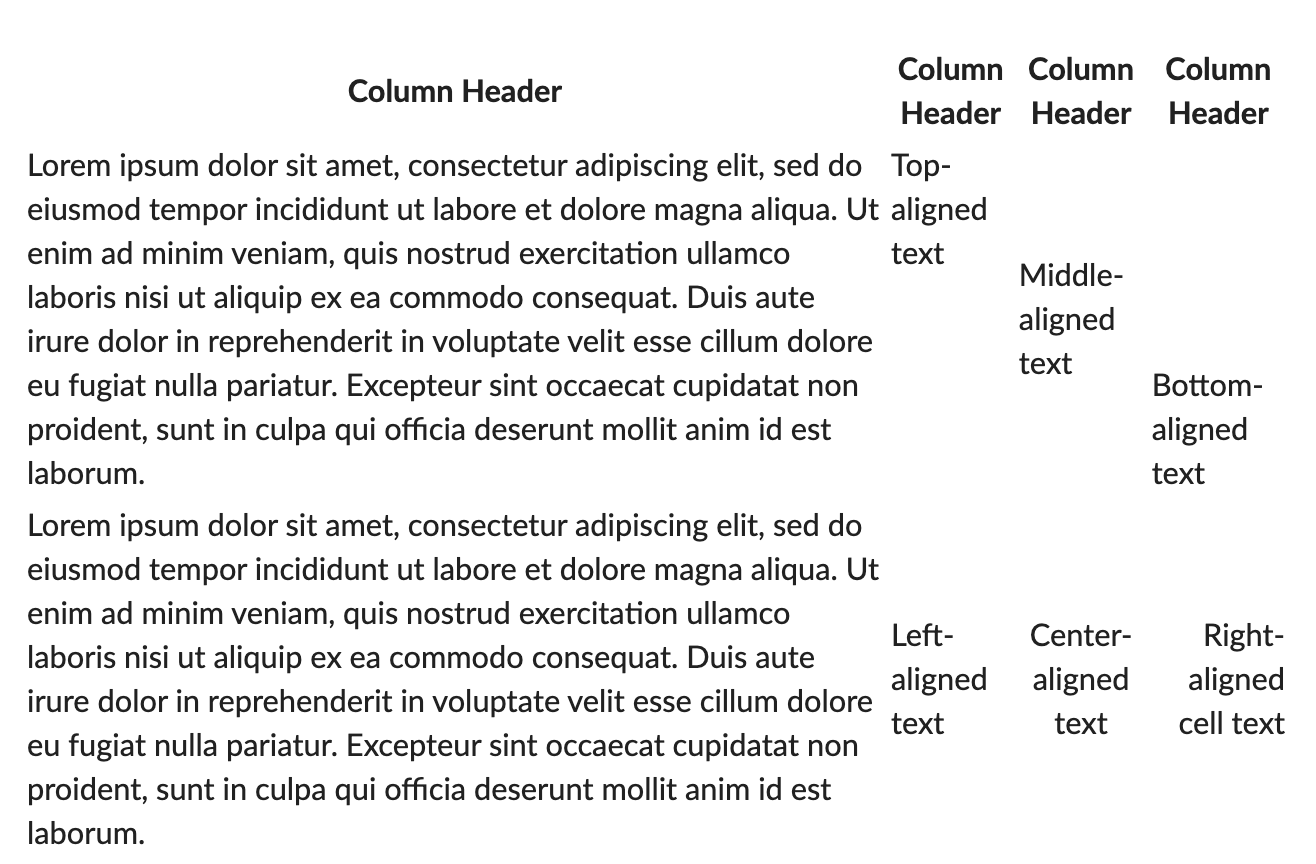
Table width (letterheads)
By default, Textile tables automatically adjust their width to fit the cell content. You can control the table width in letterheads using the available styling options.
To set a full width for tables in letterheads:
- Add a table using Textile markup.
- In the Table style section, make sure the Tables are full width check box is selected.
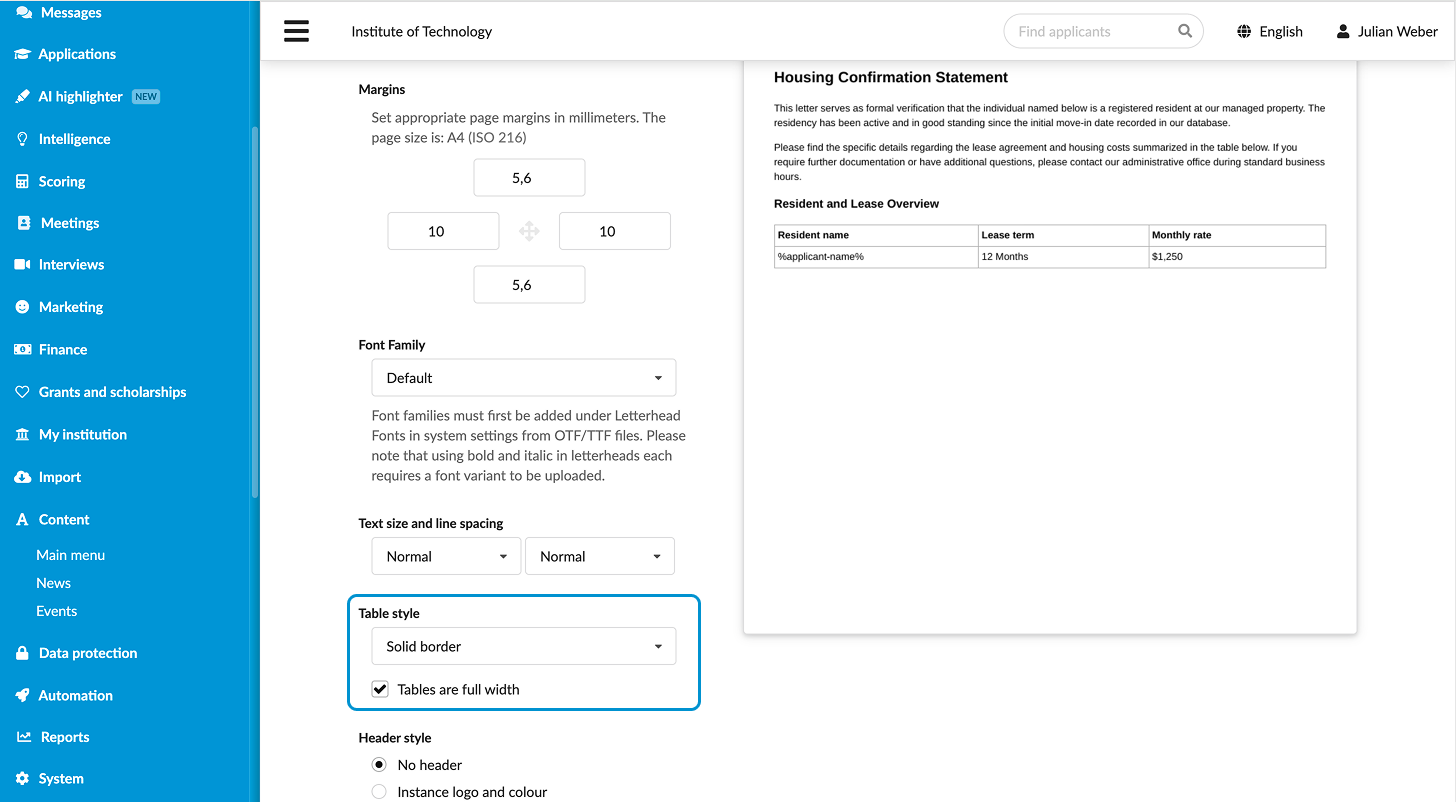
Table borders (letterheads)
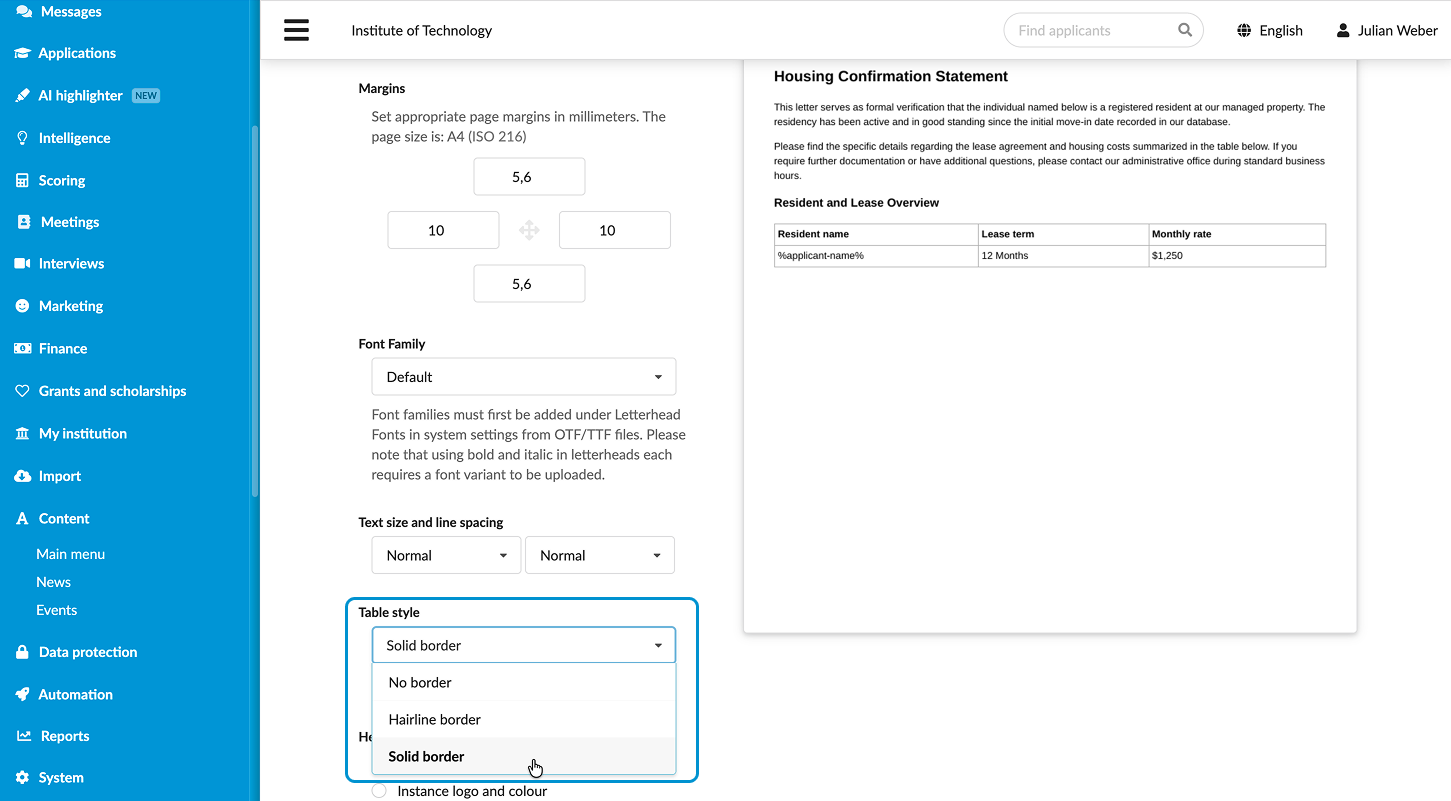
By default, Textile tables in DreamApply are displayed without borders. You can only add borders in letterheads using the available styling options.
To design a bordered table in letterheads:
- Add a table using Textile markup.
- In the Table style section, select the border style and click Save and preview.